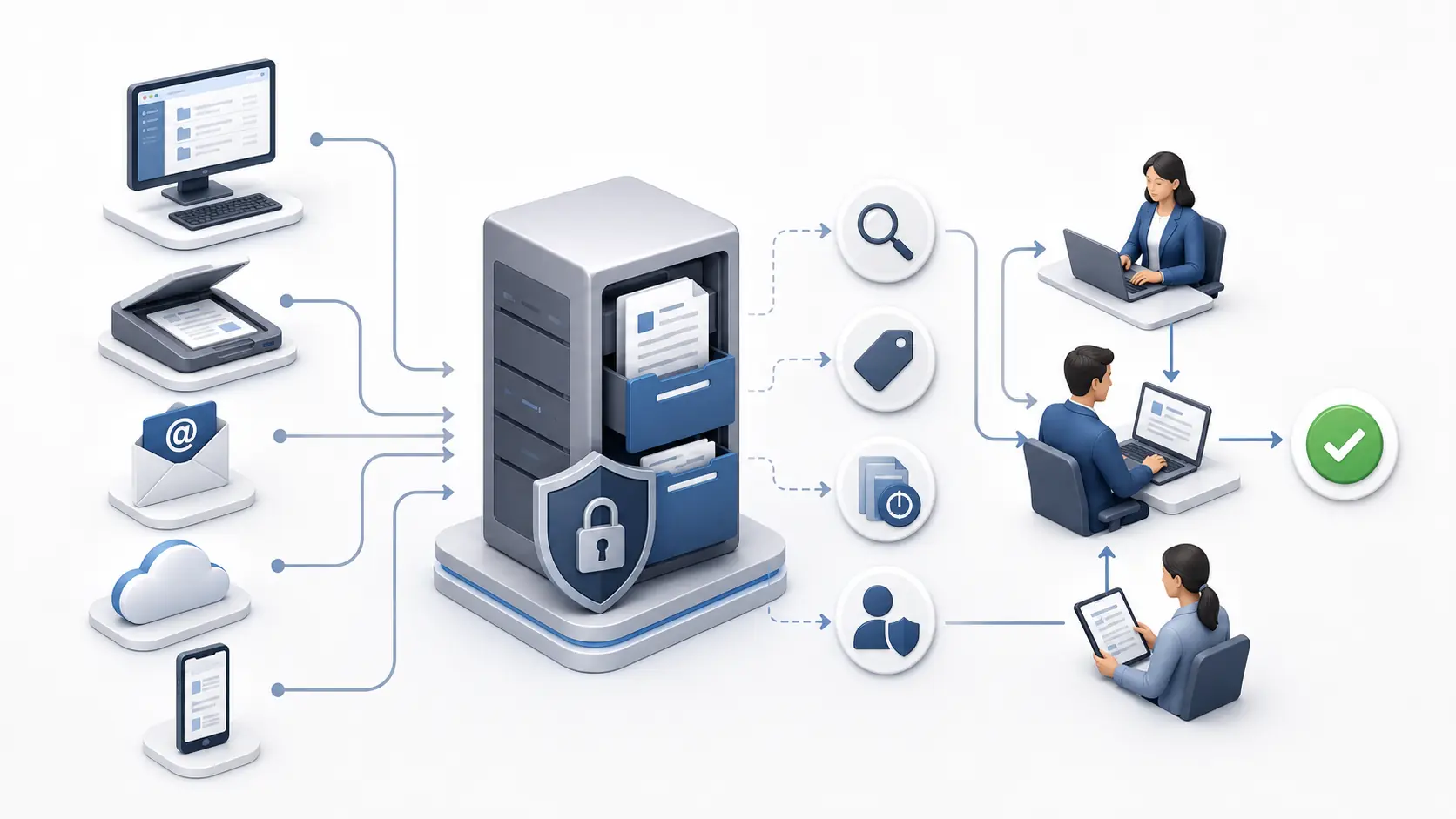
In plain English: A document management system gives an organization one controlled place to capture, organize, find, share, protect, and track business documents.
Most organizations do not set out to create a document problem. It happens gradually. A shared drive becomes a maze of folders. Important files live in email attachments. Employees save local copies with names such as “final,” “final-v2,” and “final-approved.” Finding the right document takes longer than it should, and nobody is completely sure which version is current.
A document management system—usually called a DMS—replaces that uncertainty with a structured, searchable environment. It does more than store files. It manages the information around each document: what it is, who can access it, where it is in a business process, what changed, and how long it should be retained.
What is a document management system?
A document management system is software used to capture, store, organize, retrieve, control, and track electronic documents and the information associated with them.
The documents may include contracts, invoices, employee records, policies, engineering drawings, customer files, emails, scanned paper records, images, spreadsheets, and PDFs. Instead of relying only on folders and filenames, a DMS uses metadata, permissions, search, version history, workflows, and audit records to manage documents throughout their useful life.
A useful distinction is that file storage answers, “Where is the file?” A DMS also answers, “What is this document, which version is authoritative, who has used it, what should happen next, and what rules apply to it?”
DMS vs. shared drives and basic cloud storage
| Capability | Shared drive / basic storage | Document management system |
|---|---|---|
| Organization | Folders and filenames | Folders plus metadata, document types, categories, and rules |
| Finding content | Filename or basic text search | Full-text search, metadata, filters, saved searches, and advanced criteria |
| Version control | Often manual or limited | Controlled check-in/check-out and complete version history |
| Security | Folder-level access in many cases | Granular permissions, roles, policies, and traceable access |
| Process | Email and manual follow-up | Automated workflows, tasks, notifications, and escalation |
| Governance | Depends heavily on user discipline | Retention, audit trails, records controls, and consistent policies |
How does a document management system work?
A DMS typically manages a document through connected stages. The exact process varies, but the underlying pattern is consistent:
- Capture. Files enter through uploads, scanners, email, watched folders, mobile devices, integrations, or an API.
- Classify. The document receives metadata such as customer, invoice number, department, type, date, or status. Classification may be manual, rules-based, or assisted by OCR and AI.
- Store and secure. The system places the document in a controlled repository and applies access permissions, roles, and policies.
- Retrieve. Authorized users find content through full-text search, metadata filters, categories, or saved searches.
- Collaborate and process. Users review, edit, approve, reject, route, or comment on documents according to defined business processes.
- Track and govern. The DMS records versions and activity, then applies retention, disposition, and records-management rules where required.
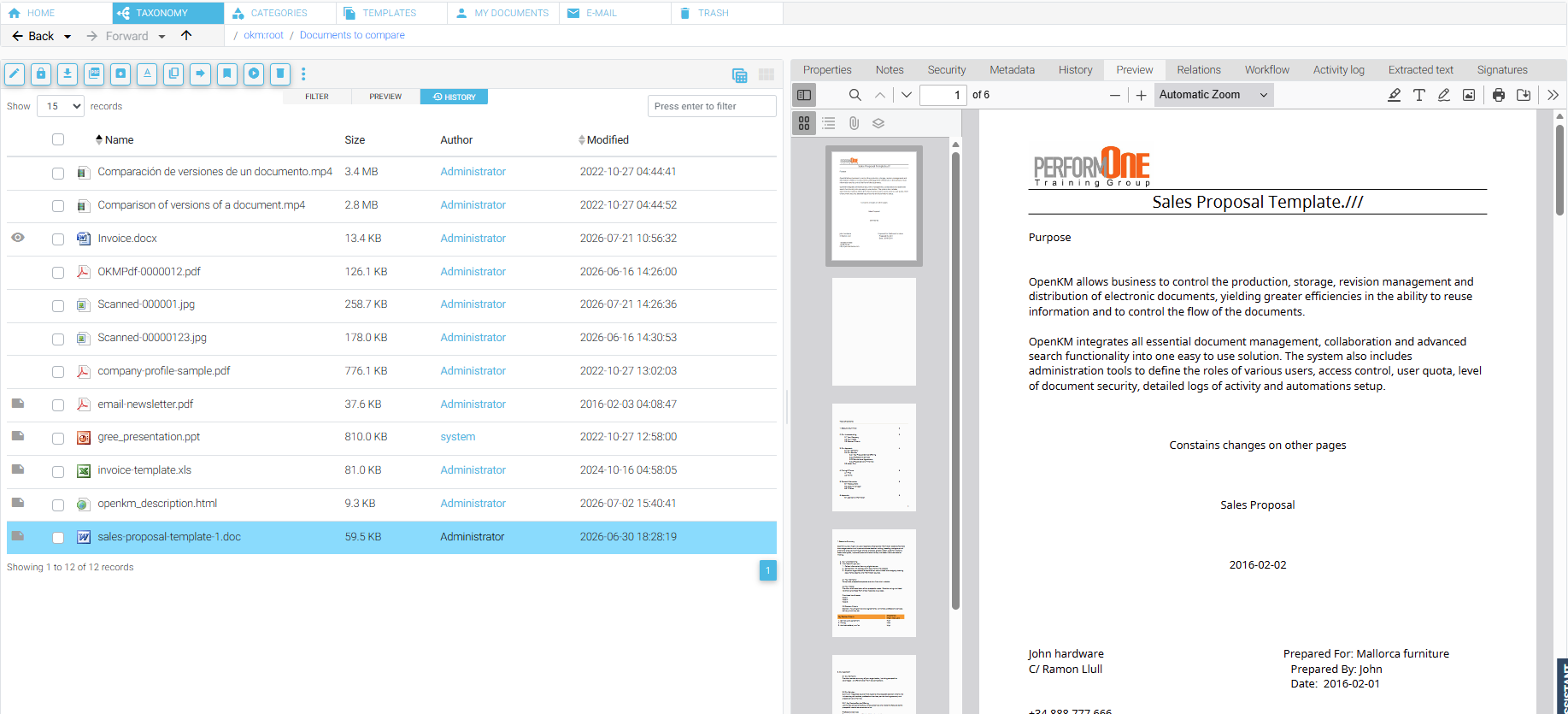
Core features of document management software
Centralized repository and metadata
A central repository provides a consistent source of truth. Metadata—structured information such as supplier, invoice number, due date, or status—makes documents easier to find and supports automation, reporting, retention, and integration.
Full-text search and OCR
Full-text search looks inside supported documents rather than relying only on filenames. When scans are processed with optical character recognition (OCR), their images can become searchable text. Strong search combines content, metadata, date ranges, document types, and filters.
Version control
Version control keeps a history of changes and reduces confusion about which copy is current. Depending on the system, users may compare versions, restore an earlier one, or check documents in and out to prevent conflicting edits.
Permissions and access control
A DMS can limit access by user, group, role, department, folder, document type, or other rules. Effective security follows least-privilege principles: people receive the access they need without unnecessary exposure.
Workflow automation
Workflow automation moves documents and tasks through a defined process. An invoice may go from capture to coding, approval, exception handling, and export to accounting. A policy may move through drafting, review, approval, publication, acknowledgment, and periodic review.
Audit trail and records controls
An audit trail records relevant activity such as uploads, downloads, edits, approvals, permission changes, and deletions. Records management and compliance controls can help keep records for required periods and dispose of them according to approved policies. Software supports governance, but it does not determine an organization’s legal obligations or guarantee legal immutability.
AI, integrations, and APIs
AI document management can assist with classification, extraction, summarization, and intelligent search. Through document management integrations, a DMS may also connect with ERP, CRM, accounting, HR, email, digital signature, identity management, and other applications. Accuracy, feasibility, scope, and cost should be validated against real documents and systems.
Business benefits of a DMS
- Faster retrieval: less time searching across folders, inboxes, and devices.
- More consistent work: metadata, templates, and workflows reduce reliance on individual habits.
- Better visibility: managers can see status, pending tasks, bottlenecks, and exceptions.
- Stronger control: permissions, versions, and audit records support accountability.
- Reduced duplication: a controlled repository limits unnecessary copies and conflicting versions.
- Remote collaboration: authorized users work with the same information across locations.
- Improved compliance readiness: retention, traceability, and controlled processes make information management easier to demonstrate.
- Scalable automation: repetitive document tasks can be standardized and integrated.
A realistic expectation: A DMS creates the structure for better information management. Results still depend on sound process design, ownership, clean metadata, user adoption, and appropriate configuration.
Is document work slowing your team down?
Discuss your users, documents, process, deployment preference, budget, and timeline with OpenKM Hub.
Discuss Your RequirementsCommon document management use cases
Accounts payable and invoice processing
Invoices can be captured, classified, processed with OCR, routed for approval, matched with supporting documents, and transferred to an accounting or ERP system. Exceptions remain visible instead of disappearing into inboxes.
Contract management
Contract management software can help teams manage drafts, supporting documents, reviews, executed agreements, renewal dates, obligations, and access restrictions. Specialized contract lifecycle requirements should be evaluated separately.
Human resources
HR can control employee files, applications, acknowledgments, policies, training records, and confidential documents while separating access by role and responsibility.
Quality and controlled documents
Organizations can manage policies, procedures, work instructions, forms, revisions, approvals, publication, acknowledgment, and scheduled reviews—especially where outdated documents must be controlled.
Legal, compliance, customer, and project records
A DMS can organize matters, correspondence, evidence, policies, proposals, orders, deliverables, and approvals around a case, customer, or project. Security and retention design remain important because obligations differ by jurisdiction and use case.
Cloud or on-premise DMS?
A cloud deployment is hosted by a provider and accessed over the internet. It can reduce infrastructure administration and speed deployment. An on-premise system runs within infrastructure controlled by the organization, which may offer greater control over architecture, data location, integrations, and maintenance schedules.
Neither model is automatically more secure or less expensive. The right decision depends on data sensitivity, internal IT capacity, regulatory requirements, integration needs, customization, availability targets, procurement rules, and total cost of ownership.
How to choose the right document management system
Start with the business process, not a feature checklist. A product demonstration is most useful when it uses representative documents and shows how real users will capture, classify, find, approve, and govern them.
- Define the problem. Identify document types, pain points, users, volumes, security needs, integrations, and desired outcomes.
- Prioritize requirements. Separate essential capabilities from preferences. Include availability, backup, recovery, accessibility, and administration.
- Test real examples. Use representative documents, metadata, searches, permissions, and workflow exceptions. Validate OCR or AI with your material.
- Evaluate total cost. Consider subscriptions or licenses, infrastructure, support, implementation, configuration, migration, integrations, training, customization, and administration.
- Clarify responsibilities. Document what the vendor, implementation team, IT, process owners, and end users must provide.
- Plan adoption. Assign ownership, train by role, measure usage, and improve after launch.
What implementation usually involves
A successful implementation is a business project supported by technology, not merely a software installation. Common stages include discovery, solution design, environment preparation, configuration, security design, metadata and taxonomy design, workflow configuration, integration, migration, testing, training, launch, and post-launch improvement.
The effort varies considerably. A small departmental repository with standard configuration is different from a multi-department deployment involving legacy migration, complex permissions, ERP integration, custom workflows, and compliance controls. Migration, consulting, configuration, workflow design, integrations, training, customization, development, and project management are professional services that should be scoped and priced according to validated requirements unless expressly included in writing.
Frequently asked questions
Is a DMS the same as cloud storage?
No. Cloud storage primarily stores and synchronizes files. A DMS adds structured classification, advanced search, version control, workflows, permissions, auditability, retention, and other document-lifecycle controls.
Can a DMS manage scanned paper documents?
Yes. Scanned documents can be imported and indexed. OCR can make their text searchable, and extraction tools can capture selected data. Image quality, language, handwriting, and layout all affect accuracy.
Does a DMS guarantee compliance?
No. A DMS can support compliance through controlled access, audit records, retention, versioning, and repeatable processes. Compliance also depends on policies, configuration, governance, infrastructure, training, and the organization’s specific obligations.
Can a DMS integrate with our existing software?
Often, yes. Many systems provide APIs, connectors, import tools, and integration options. Feasibility, effort, and cost depend on both systems, the desired data flow, authentication, security, volume, error handling, and testing requirements.
How long does implementation take?
There is no responsible universal estimate. Timeline depends on scope, users, departments, document volume, migration quality, workflows, integrations, customization, infrastructure readiness, decision speed, and stakeholder availability.
What does a document management system cost?
Cost may include licenses or subscriptions, maintenance and support, hosting or infrastructure, implementation, configuration, migration, integrations, training, customization, and ongoing administration. A credible estimate requires a defined scope.
A practical next step
Begin with one high-value process.
Select a document type with visible pain, a clear owner, measurable outcomes, and manageable integration requirements. OpenKM Hub can help you evaluate document management, workflow, OCR, migration, integrations, and deployment options without assuming every project requires customization.