
Moving documents into a new document management system is not simply a file-copying exercise. A successful migration must preserve the information people rely on: document content, folder relationships, metadata, permissions, versions, and—when required—links used by other business systems.
The safest approach is to treat the move as a controlled business project: decide what should migrate, map it to the new structure, test representative content, and validate the result before retiring the old repository.
This document management migration checklist explains the decisions and controls that should be in place before, during, and after the move. It applies whether the source is a shared drive, an older document management system, a collection of departmental repositories, or another structured platform.
Article summaryKey takeaways+
- A DMS migration requires a defined scope, accountable owners, and measurable acceptance criteria.
- Inventory documents, metadata, versions, permissions, integrations, and exceptions before selecting a migration method.
- Design the destination structure and approve source-to-destination mapping before moving production content.
- Use representative content to test the migration method, mappings, performance, and exception handling.
- Validate metadata, permissions, versions, identifiers, search, and business access—not only file or folder counts.
- Plan the source freeze, final changes, recovery decisions, communications, and post-launch support before cutover.
Why document migrations fail
Migration problems usually begin before the first file is moved. An organization may know how many gigabytes it has but not how many documents, duplicates, unsupported files, inaccessible folders, or business-critical versions are included. Folder names may have become a substitute for metadata, while permissions may have accumulated for years without clear ownership.
When these issues are carried into a new system without analysis, the project may reproduce the same disorder in a different repository. Common causes include moving obsolete or personal files, designing the destination before understanding how documents are used, assuming metadata or permissions will transfer without mapping, overlooking integrations that depend on legacy identifiers, and testing only whether files open.
A checklist cannot eliminate every technical risk, but it makes those risks visible early enough to manage them.
Phase 1: Define the migration objective and scope
Begin with a short written definition of what the project is expected to accomplish. “Move everything to OpenKM” is not sufficiently precise.
Identify the source systems and departments in scope, what must remain in the legacy environment, and which information must be preserved. This planning should address metadata, versions, permissions, relationships, comments, signatures, identifiers used by other systems, and whether legacy audit information must be preserved, archived separately, or made available through another approved method.
Document regulatory, contractual, retention, legal-hold, privacy, and data-residency requirements, along with the acceptable outage or read-only period and the criteria that will determine acceptance. Assign an accountable business owner as well as a technical lead. IT can move data, but document owners must decide what the information means and which exceptions are acceptable.
Phase 2: Inventory the source content
A source inventory establishes the true size and complexity of the work. Record document and folder counts, storage volume and growth, file types and sizes, long paths, duplicates, empty or corrupted files, encryption, versions, metadata fields, users and groups, permission inheritance, integrations, and records under retention or hold.
Segment counts by department or content class. A single total can hide a small area that contains most of the exceptions and needs different handling.
Decide what should not migrate
Migration is an opportunity to reduce unnecessary content, but deletion should not be improvised. Establish approved rules for duplicates, drafts, temporary files, obsolete exports, and content beyond its retention period. Business, records, compliance, or legal owners should approve disposition where required.
Phase 3: Design the destination repository
The destination should reflect how the organization will govern and retrieve information after launch—not simply reproduce every historical folder. Define the taxonomy, document types, required and optional metadata, naming rules, user roles, permissions, retention requirements, search, reporting, workflows, OCR, automation, and ownership after go-live.
Coordinate this work with the broader document management system implementation plan. Migration and configuration are linked: the import cannot be mapped reliably until the destination model is understood.
Phase 4: Create the migration mapping
The mapping document connects each source element with its destination rule, exception handling, and validation method.
| Source element | Destination rule | Exception handling | Validation method |
|---|---|---|---|
| Folder path | Destination taxonomy | Invalid or excessive path | Path reconciliation |
| Metadata | Target property field | Missing or invalid value | Field-level report |
| User or group | OpenKM user or role | Inactive or missing account | Permission test |
| Version | Approved version-history rule | Unsupported or incomplete history | Version-count check |
The same specification should cover document types, categories, system dates, creators, owners, legacy identifiers, and records that fail automated import. Transformation rules must be explicit, and exceptions should be logged instead of silently forced into inaccurate metadata or inappropriate access.
Phase 5: Select and validate the migration method
The method depends on the source and the information that must be preserved. Options may include repository export and import, filesystem import, an import utility, API-based migration, database-assisted work, or custom scripts and connectors.
Evaluate whether the source can produce a complete usable export; which metadata and history are included; whether identifiers are needed by integrations; how permissions will be recreated; what throughput is realistic; whether the process can be stopped, resumed, repeated, and audited; and how failed or skipped items will be reported.
A small technical proof with real documents is usually more reliable than assumptions based on product names or file counts.
Using OpenKM Repository Import as part of a migration
OpenKM 8.2 provides a Repository Import utility in the Administration utilities area. The appropriate input format and the repository information that can be restored depend on how the source content was prepared or exported. Validate the procedure with representative content before using it in production. Repository Import is one execution tool within a broader migration plan; it does not replace discovery, mapping, testing, validation, or cutover management.
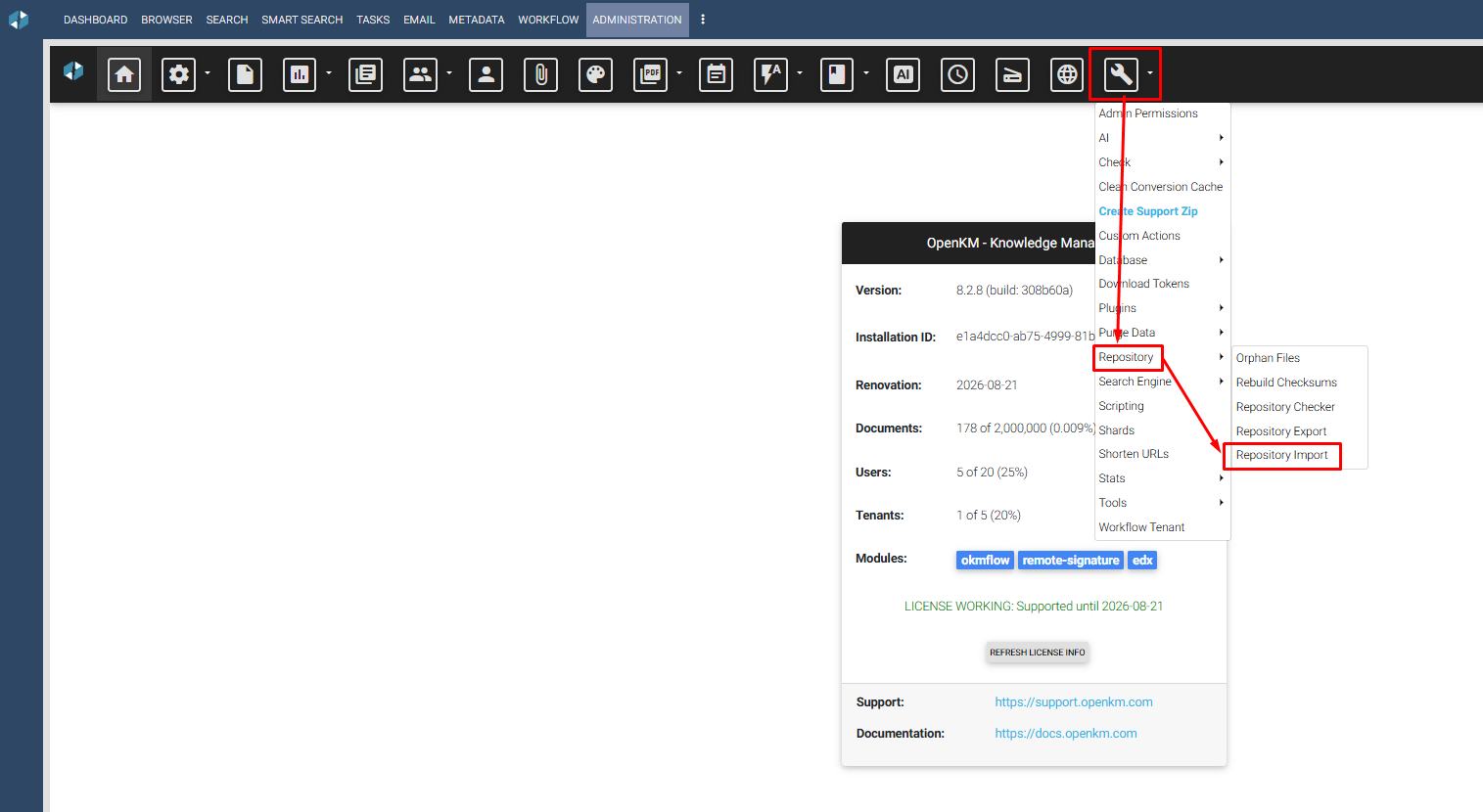
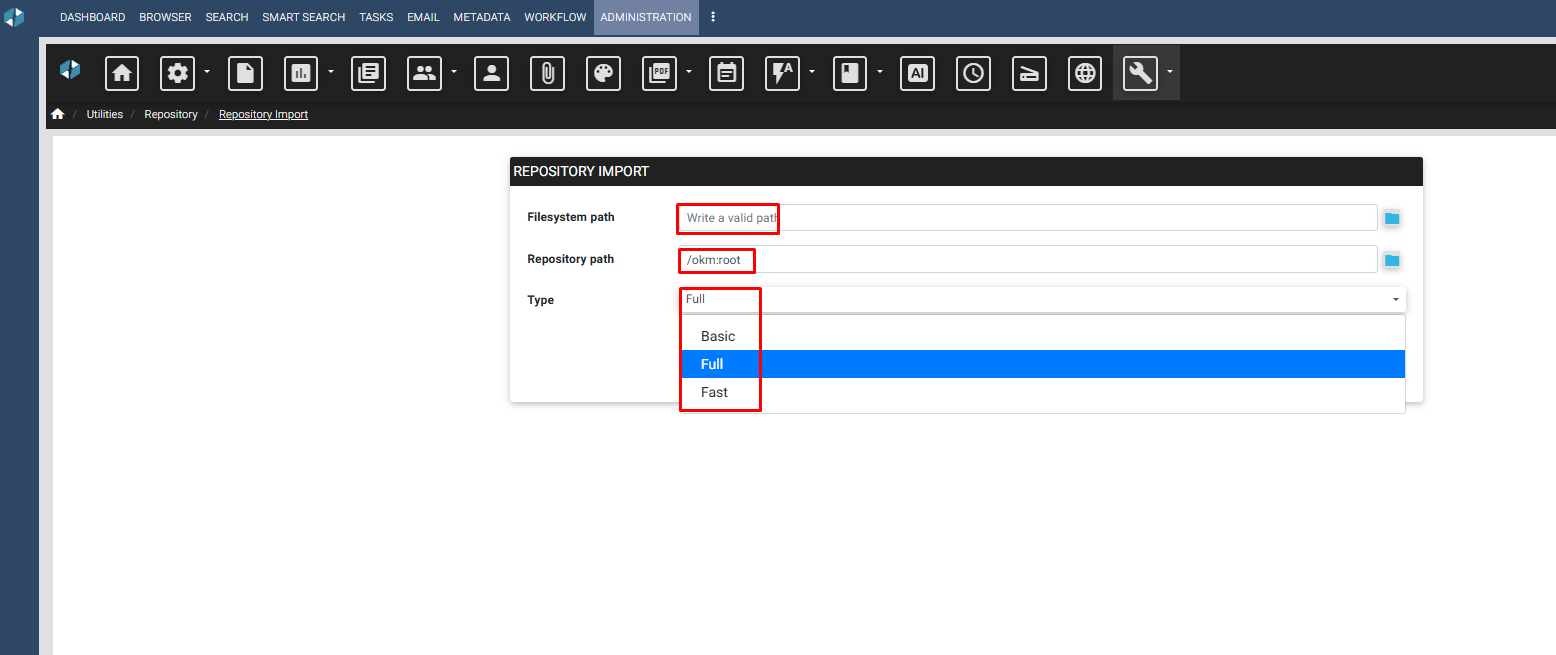
Before using this function, confirm the exact OpenKM version and documentation, the source format, server-side path, repository destination, available metadata and history, applicable import type, compatibility with any prior export, and a tested backup and recovery plan.
Do not choose Basic, Full, or Fast from the labels alone. Their correct use must be validated against the applicable OpenKM version, source format, and migration objective. Consult the version-specific OpenKM Repository Import documentation or authorized support before production use.
Phase 6: Run a representative pilot migration
The pilot should include normal documents and difficult exceptions: common and uncommon file types, large files, deep folders, long names, incomplete metadata, multiple versions, restricted permissions, workflow or integration references, and multiple languages or character sets where applicable.
Use the same tools, mappings, and infrastructure planned for production. Record duration, throughput, warnings, failures, resource use, and manual work. The result must be repeatable; a one-time import with undocumented corrections is not an adequate production plan.
Phase 7: Validate the migrated content
Technical reconciliation
Compare document and folder counts, successful and failed items, file sizes or checksums where appropriate, metadata completeness, version counts, permissions, identifiers, integration references, and search-indexing status.
Business acceptance
Business owners should find documents, confirm context and history, and test authorized and unauthorized access. Workflows, reports, OCR, and integrations that depend on migrated content need separate tests. Define acceptance thresholds before the final move; “most files appear to be present” is not a defensible criterion.
Phase 8: Plan the cutover
The cutover plan should state when the source becomes read-only, how the final delta will be captured, who authorizes go-live, and how users will be informed. Include a recovery checkpoint, a sequenced runbook, owners, expected duration, go/no-go decisions, support contacts, and the period during which the legacy system remains available.
Avoid an irreversible shutdown immediately after import. The organization needs time to confirm that users, integrations, searches, and operational processes work with the migrated information.
Phase 9: Monitor after go-live
Monitor failed searches, permission requests, missing metadata, broken links, integration errors, performance, and user-reported exceptions. Maintain a controlled issue register with severity, owner, resolution, and business impact. Once acceptance and retention obligations are satisfied, follow the approved plan for archiving, retaining, or decommissioning the source.
Document management migration checklist
Scope and governance
- Business objective and acceptance criteria approved.
- Source and destination systems identified.
- Content, metadata, history, permissions, and integrations in scope documented.
- Business, technical, security, records, and compliance owners assigned.
- Legal, contractual, retention, privacy, and data-location requirements reviewed.
Discovery and design
- Documents, folders, storage, file types, versions, and exceptions inventoried.
- Duplicate, obsolete, and excluded-content rules approved.
- Destination taxonomy, metadata, naming, and permissions designed.
- Source-to-destination mapping completed.
- Invalid values, missing users, and other exceptions have defined handling rules.
Tools and testing
- Migration method validated against the source and applicable OpenKM version.
- Backup and recovery plan confirmed.
- Representative pilot executed with production-like tools and infrastructure.
- Throughput, errors, and manual effort measured.
- Reconciliation and business acceptance completed.
Cutover and closeout
- Source freeze and final-delta procedure approved.
- Runbook, owners, communications, and go/no-go criteria documented.
- Production migration reconciled and accepted.
- Permissions, search, workflows, reports, and integrations verified.
- Post-launch issues tracked to resolution.
- Legacy retention or decommissioning completed under an approved policy.
When professional migration assistance may be needed
Migration cost is driven by complexity as much as volume. Specialist assistance is usually justified when a project involves complex metadata transformations, permission exceptions, legacy identifiers, several source repositories, substantial version histories, custom integrations, or a production cutover with limited downtime.
A proposal should separate software licenses and support from professional services. Discovery, source analysis, information architecture, data cleanup, mapping, scripting, configuration, pilot execution, validation, training, cutover assistance, development, and project management are separately scoped professional services unless expressly included in writing.
Frequently asked questions
How long does a DMS migration take?
There is no reliable timeline based only on storage volume or document count. Source quality, metadata, permissions, versions, integrations, transfer speed, validation requirements, and exception handling all affect duration. A representative pilot provides a better basis for estimating the production move.
What information should be preserved during document migration?
The answer depends on business, legal, records, and operational requirements. Scope may include document content, folder relationships, metadata, versions, permissions, identifiers, and links used by other systems. Legacy audit information may need to be preserved, archived separately, or made available through another approved method.
Can permissions and document versions be migrated?
They may be included in scope, but they should not be assumed to transfer automatically. The available result depends on the source, export format, migration method, destination configuration, and applicable OpenKM version. Test representative permission patterns and version histories before production.
How should a document migration be validated?
Use automated reconciliation and business acceptance. Compare counts, failures, metadata, versions, permissions, identifiers, and search status, then have document owners test representative work and access scenarios.
What is the difference between filesystem import and repository import?
A filesystem import begins with files and folders available on the server. A structured repository import may begin with content prepared or exported in a format that includes additional repository information. Supported input and restorable information depend on the applicable OpenKM version and how the source was prepared, so the method must be validated before production use.
Plan the migration before choosing the shortcut
The import itself may be the shortest part of a document management migration. The real work is deciding what should move, preserving the information that gives each document meaning, testing the result, and controlling the transition.
Define the project before estimating it
Prepare a migration scope based on real source content.
OpenKM USA can help evaluate your repository, document volume, metadata, permissions, versions, integrations, and migration objectives. Analysis, migration, configuration, development, testing, and project management are professional services scoped and quoted separately.